
FSXFlight: A Powerful Flight Simulation Tool
Readers of this blog are by now familiar with ForeFlight, the stunning aviation application for Apple iOS devices. In brief, ForeFlight, which is offered for a $75 subscription, offers users touch flight planning, navigation and airport charts, airport information, weather radar, and much more, all in an easy-to-use application. When paired with external GPS and ADS-B devices, ForeFlight becomes a moving map display complete with in-flight charts and weather information. Another $75 (for a total of $150 yearly) buys users geo-referenced approach plates, a tremendously useful safety tool, and an incredible convenience.
Enter here another branch of my aviation hobby: flight simulation. I’ve been using the Microsoft Flight Simulator series for around ten years. I first started using Flight Simulator 2002…I would fly around until I was done; then crash the airplane, as I didn’t yet know how to land. As my interest increased, I taught myself to fly properly, and then to land. Microsoft released two later versions of the game, ending up with Flight Simulator X, which I have used for over three years. These days, I fly all around the world, often using VATSIM, which offers real-world air traffic control services for flight simulation pilots. I do a lot of flying for virtual airline organizations, which simulate real-world airline operations with incredible detail.
Of course, the simulator flying follows along with my real-world flying, and I had used ForeFlight aboard real aircraft for quite some time. I also used it to plan flights on the simulator. This, needless to say, was excellent training on how to use the app. So, when I saw a report on Twitter about a program to link Flight Simulator X and ForeFlight, I knew I had to try it! The program in question is called FSXFlight. It is a simple .exe utility developed by software developer Jacob Eiting (on Twitter at @jeiting). The program normally sells for $14.99, but is currently selling for only $4.99. It’s worth far more!
After purchasing and downloading FSXFlight, it takes only a few steps to connect ForeFlight with Flight Simulator X. Once connected, FSXFlight instantly sends navigation information from Flight Simulator X to ForeFlight. Essentially, ForeFlight believes it is receiving GPS signals from a real receiver. Thus, your postion, speed, altitude, heading, and other vital facts are displayed on the ForeFlight screen. This is an incredible advancement for flight simulation…now users have an external moving map, complete with weather radar, airport information, and access to en-route and airport charts!
Below are a few screenshots from ForeFlight (running on a third-generation iPad), showing FSXFlight in use during a Flight Simulator X flight from Charleston, South Carolina, to Orlando, Florida. As you can see, even the geo-referenced approach plates perform perfectly with FSXFlight.
click each image to enlarge


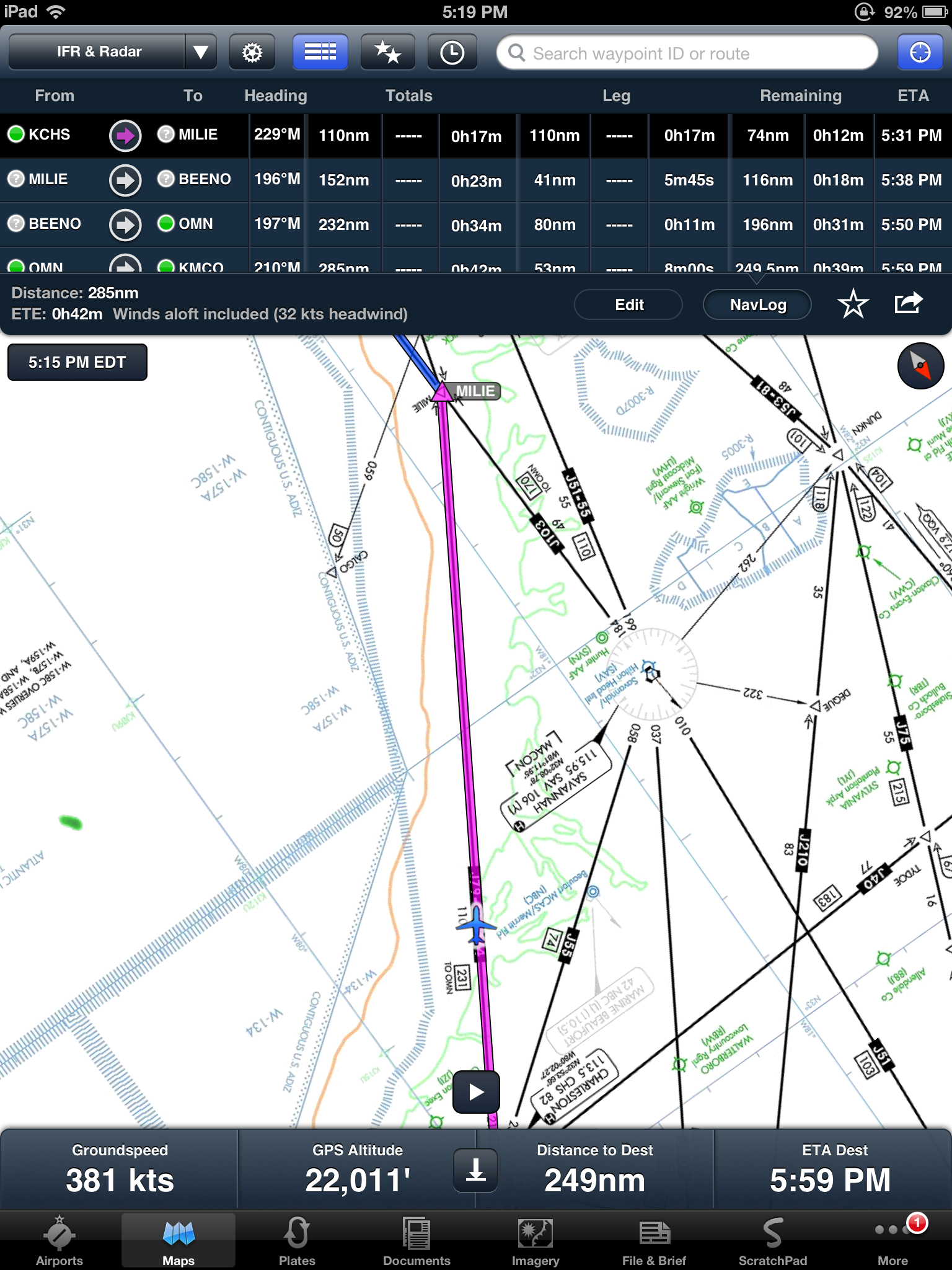

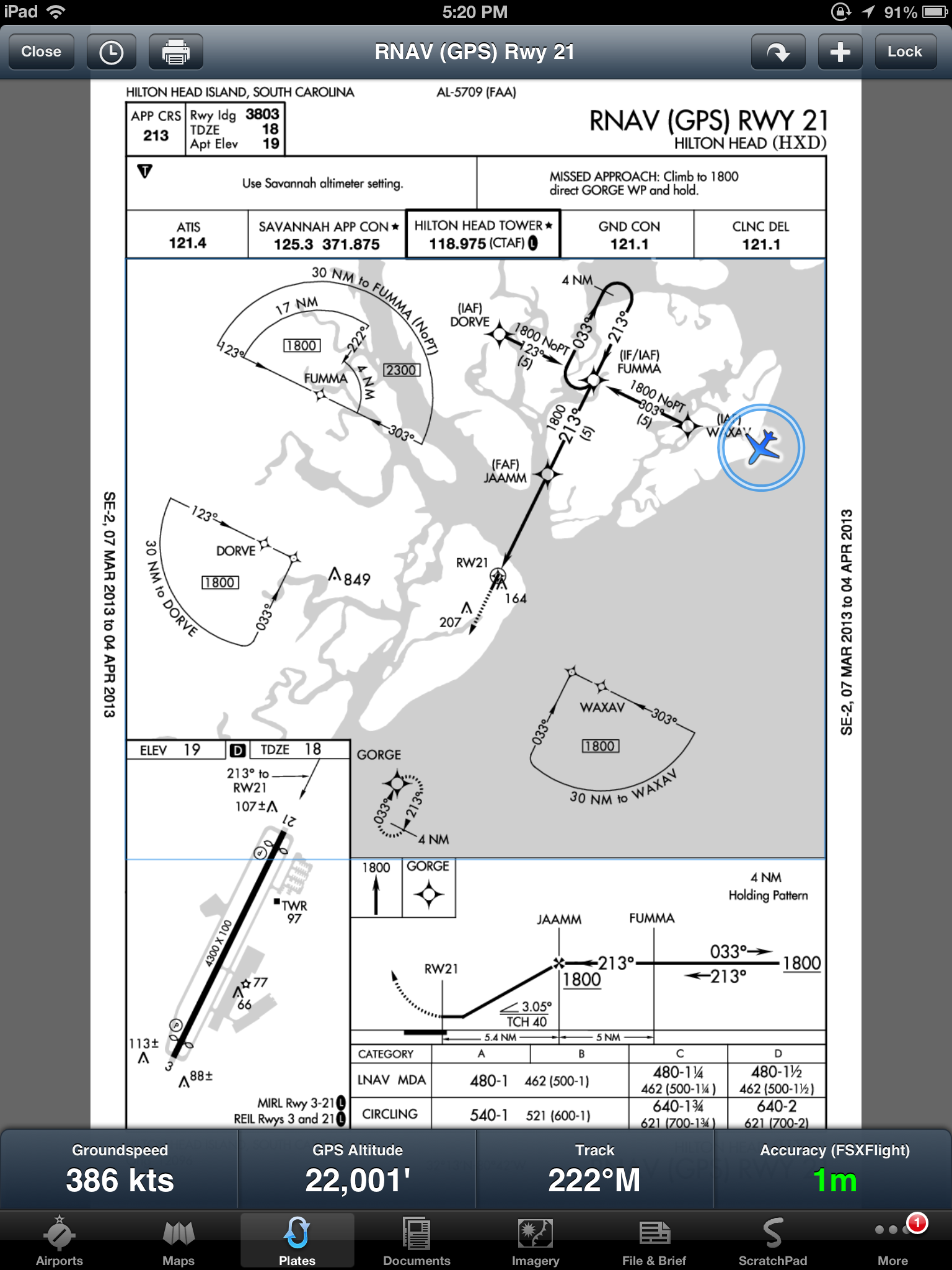
Besides the obvious benefits to flight simulation enthusiasts, FSXFlight can create a powerful training aid as well. This works in two ways: first, what better way to learn all about the countless features of ForeFlight than to simulate an actual flight using the product? Now features such as the geo-referenced approach plates can be showcased using only a computer and a copy of Flight Simulator X; instead of actually having to be in an airplane.
Secondly, I see good possibilites for this product in support of flight training. I personally used ForeFlight, FSXFlight, and Flight Simulator X to become familiar with VOR navigation, before practicing in the real world. Concepts such as chart reading and navigation can be taught in the comfort of one’s home, flying a virtual aircraft, before they are put into practice in the skies. It’s much easier to learn these concepts while sitting on the ground, rather than in the air while dealing with distractions such as turbulence, traffic, and radio transmissions.
All in all, I would call FSXFlight the best $5 I have ever spent. It links two outstanding programs – Flight Simulator X and ForeFlight – adding to each the many benefits of the other. In my experience, which involves dozens of flight hours, I have never experienced a crash of FSXFlight…or a crash of FSX caused by it. The program runs in the background, and connects automatically to FSX when the game is opened. For just a few dollars, you have a perfectly reliable program whose value cannot be overstated.
FSXFlight is available at fsxflight.com
For more about ForeFlight, please visit their website at foreflight.com
Microsoft Flight Simulator X can be purchased from retailers such as Amazon for $20 – $30.
 Thoughts from Aloft
Hi Matt. Your blog is incredibly informative. My son is getting his license so we are just getting into all the ancillary things that he can use to advance in his training. I’ve read several of your posts and they answer many of my questions. We just bought him an iPad Mini for his birthday. With the mount you suggest he will be able to use it quite easily. Also, this blog about how to use FSX and Foreflight with FSXFlight is awesome info.
Please keep blogging. I don’t see any new ones this year but you have sure hit the important questions that I have so far. Looking forward to seeing more from you. Thanks!