
Airborne with the iPad Mini
On November 2, Apple began selling the iPad Mini. A visit was made to the Apple Store at Knoxville’s West Town Mall, and, upon leaving an hour later, my Dad had acquired the device. For months, I‘ve been hoping for a Mini, due to the possibility for use in aircraft. Now that a Mini had been purchased; we needed to test it out in the sky.
Yesterday…Sunday, November the 4th…Dad and I took the iPad Mini on a test flight. We did a round-trip flight from Moore-Murrell Airport (KMOR) to Knoxville’s Downtown Island Airport (KDKX) and back. This trip takes well under an hour, total; but it provides ample time to demonstrate and sample the iPad Mini’s capabilities in the air.
The model of the device utilized was the 32 gigabyte, Wi-Fi only version. The Wi-Fi only version, it should be noted, possesses no internal GPS chip. However, many of you know that flying with an iPad essentially demands the use of an external GPS antenna. In our case, we utilized the Appareo Stratus coupled with the app ForeFlight. For those unfamiliar with the Stratus, it provides wireless GPS signal and ADS-B weather to multiple iOS devices over a Wi-Fi connection. We have used the Stratus for several months, and have found it to be worth its weight in gold. Of course, other external GPS devices can be used, and Dual’s XGPS150 was also tested by us with excellent results.
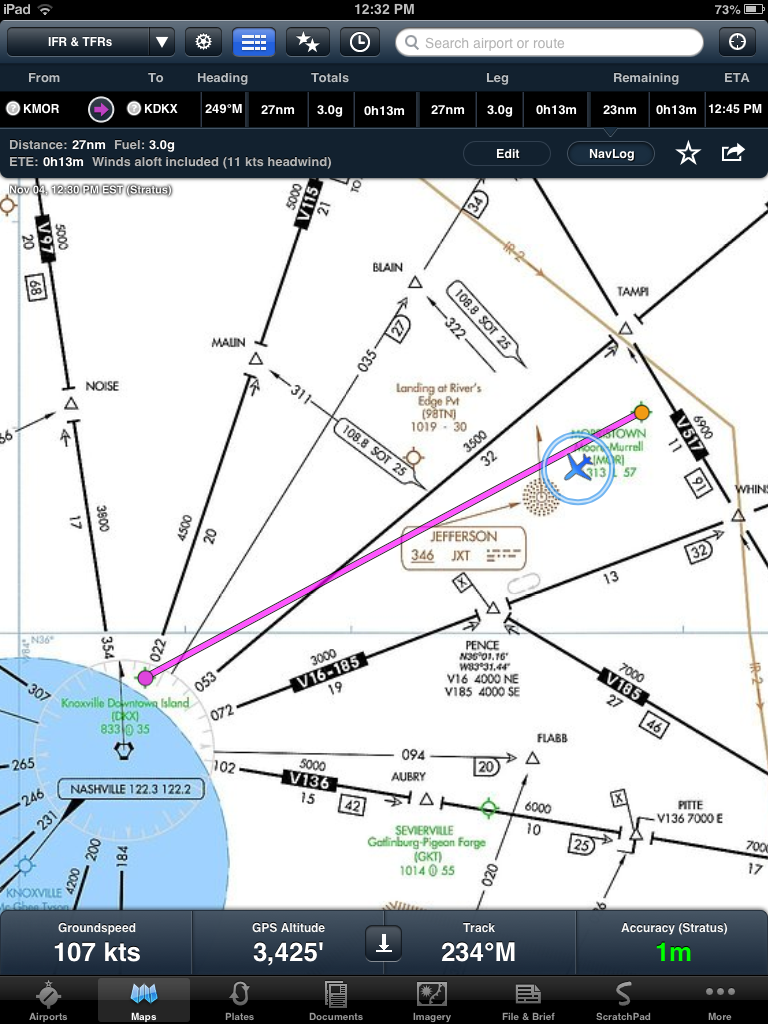
One complaint I heard several times about the iPad Mini referenced the display. Apple did not include their Retina display technology on the Mini, and this was cause for much distress among tech writers and public commenters. I went into the Apple Store expecting to find the display fuzzy. It is not! The display is extremely clear, and charts and approach plates are easily readable with minimal zoom. The screenshots below demonstrate.
An IFR low chart in ForeFlight on the iPad Mini…
…an approach plate, with some zoom…

…and an approach plate, with virtually no zoom.

As you can see, the display is very clear and very readable. Other charts, such as VFR sectionals, also display with remarkable clarity. Remember that these charts look only so good even on Retina displays, and the difference is almost negligible, especially on the smaller display.
ForeFlight’s performance on the iPad Mini was superb. The app is identical to the one found on the larger iPad, as the device merely shrinks down iPad apps to fit the Mini’s display. It is fluid and responsive, and we did not experience any glitches or technical issues during the flight.
The true advantage of the Mini is, obviously, the size. This is especially true in the cockpit of an aircraft, where available space is often at a premium. On aircraft such as the Cessna 182 used in this test, there is no available space on the panel to mount an iPad. A yoke mount is similarly difficult, and most other mounting locations end up blocking the view of important instruments, which is quite problematic, especially in IFR conditions. I have flown with two iPads now…a first and then a third generation…strapped to one knee with a customized velcro kneeboard device. The Mini’s smaller size opens up a world of possibilites for mounts. Our plan is to place it somewhere just left of the panel, where we currently have a mount for a Garmin GPS. RAM Mounting Systems makes several mounts for the Mini, and we will likely use one of them. To demonstrate this angle, here is a photograph showing the Mini on that area of the panel. Obviously this is a rough estimate of where it will eventually be mounted, but it gives a general idea of the size of the device compared with the available space.

So, the conclusion. I believe the iPad Mini is huge for the aviation community. The smaller size is excellent for cockpits with limited room. The device has virtually all of the functionality of the larger model in a smaller, thinner package. The display, non-retina that it is, is very clear, crisp, and readable. Apps perform flawlessly, and there is zero learning curve from a larger iPad. Many more in-cockpit mounting possibilities are now available. The lower price tag will surely attract new and repeat buyers alike. I have two suggestions for purchase…first, buy the 32GB version, rather than the 16GB. Downloading aeronautical charts for the entire country takes a sizable chunk of memory (around 8 gigabytes according to http://foreflight.com/ipad/faqs/#10). In order to manage this, in addition to your music, apps, books, videos, and other content, the 32GB version is the way to go. Second; don’t worry about getting the Wi+Fi / Cellular version of the Mini in order to get the internal GPS chip. I would not advise using the built-in GPS for flying. Instead, choose an external antenna. The Dual XGPS150, as mentioned, works very well, connects over Bluetooth, and costs only around $100. The ultimate solution is the Stratus, which provides GPS and ADS-B weather to multiple devices for a one-time cost of $799. Of course, many other GPS products are available; the decision is up to the buyer and their specific needs and wants.
Stay tuned to this blog. I’ll have another post when we devise a mounting solution in the plane.
As usual, your thoughts and comments are welcome! Share them by clicking “Leave a Comment” at the top of this post, or on Twitter at @mdgjedde
 Thoughts from Aloft
Thanks for the informative review Matthew.